
Opened your PC this week and found a Windows 11 Start menu that looks nothing like the one you used last month? You are not imagining it, and you did not click anything wrong. Microsoft has finished pushing its 2025 Start menu redesign to every Windows 11 machine on version 24H2 and 25H2, and as of July 1, 2026 the rollout is complete for all Home and Pro users on non-managed devices. It arrived quietly through the normal Windows Update process, which is why so many people are staring at an unfamiliar desktop this week.
Here is exactly what changed, why Microsoft did it, how to tune the new layout to your taste, and what is coming next so you are not caught off guard a second time.
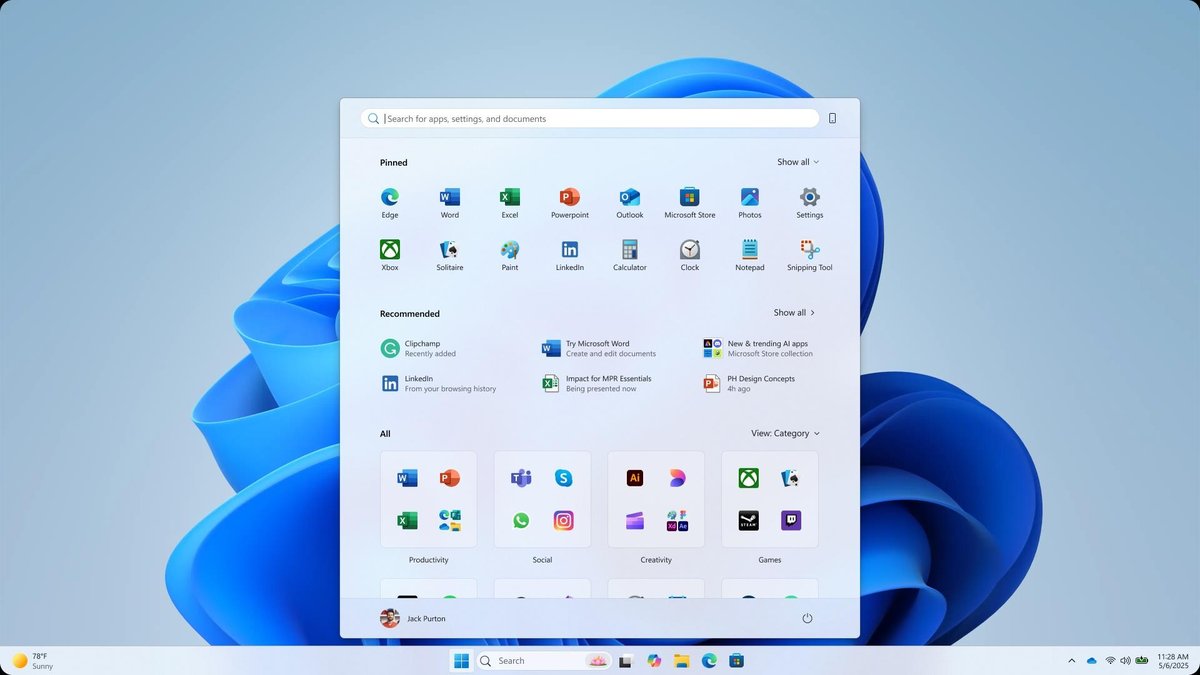
What changed in the Windows 11 Start menu today
The redesign is live now for everyone on 24H2 and 25H2, so this is not a preview. Three things are different.
First, the layout is now a single scrollable page. Previously you clicked back and forth between a pinned page and a separate “All apps” page. Now pinned apps, the recommended items, and your full app list all live on one page you simply scroll through.
Second, there is a new Category view for the All Apps list. Instead of one long alphabetical wall of apps, Windows automatically groups them into folders such as Productivity, Social, Creativity and Games. A category only appears once the system detects at least three apps that fit it. If you prefer the old behaviour, a “View” dropdown in the All section lets you switch between Category view, a grid view, and the traditional A-Z list. Microsoft’s own design blog says the goal was to make the app list “reminiscent of your phone” so you can browse without scrolling endlessly through an alphabetical list.
Third, you can hide the Recommended section (the block that surfaces recent files and suggested apps).
How to hide the Recommended section
- Open Settings.
- Go to Personalization > Start.
- Turn off the toggle labelled “Show recommended files in Start, recent files in File Explorer, and items in Jump Lists.”
One important caveat before you flip that switch: it is not a Start-menu-only setting. The same toggle also removes recent files from File Explorer and clears the recent items from taskbar jump lists (the right-click menus on your pinned taskbar apps). If you rely on those quick-access lists, turning off Recommended in Start means losing them too. Right now that is the trade-off; there is no way to hide only the Start section without affecting the rest.
This redesign is landing alongside the broader July 2026 update cycle, arriving just ahead of the July 14 security update. If you want the full picture of what else is changing this month, see our guide to the Windows 11 July 2026 update: what’s new and how to get it early.
What is coming next (Insider only for now)
Microsoft is already testing more Start menu controls, but be clear on this: these are only in the Windows Insider Experimental Channel (the build 26300.8553 era) and regular users cannot get them yet. They are expected to reach everyone later this year with the Windows 11 26H2 update. Three additions stand out:
- Size presets: Small and Large layout options. Large shows more pinned-app columns and wider category columns; Small is a compact layout better suited to lower-resolution screens.
- Independent section toggles: separate show/hide switches for the Pinned, All Apps and Recommended sections individually, rather than the single combined toggle available today. This is the fix for the trade-off described above.
- Hide your account details: an option to hide your name and profile picture from the Start menu, handy when you are presenting or screen-sharing.
Until 26H2 ships, none of these are available on a normal (non-Insider) PC, so there is no setting to look for yet.
When will it reach your PC?
For the redesigned Start menu that is live today, there is nothing to do: it installs automatically through Windows Update. If you have not seen it yet, go to Settings > Windows Update > Check for updates to pull it sooner. The resize and per-section controls will follow with the 26H2 update expected later this year.
Sources: Microsoft Design, Windows Latest, PCWorld
