
Windows 11 now restarts once a month for updates instead of several times, and the change is already reaching ordinary PCs. Microsoft has published a support document, KB5121772, explaining the new behaviour. It applies to Windows updates released on and after 28 July 2026. If your PC used to reboot for a driver on one day, .NET on another and the security patch a week later, that pattern should be over.
We covered this feature in July when it was still an Insider Beta test, with no confirmed date for a general release. It has since shipped. Windows Latest reports the change covers Windows 11 versions 24H2, 25H2 and 26H1. Microsoft’s support document itself does not list version numbers.
What Windows 11 bundles into that one restart
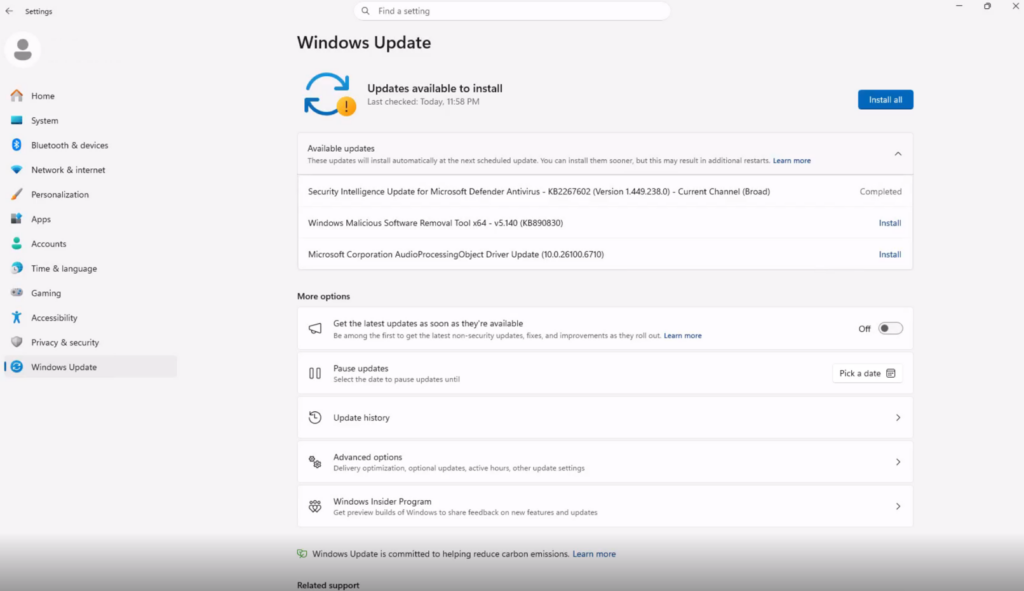
Updates that need a reboot no longer install on their own. They wait in the background until your monthly security update is ready. Windows then installs everything together and schedules a single restart. Microsoft aligns three categories of update to that monthly cycle:
- Driver updates delivered through Windows Update
- .NET updates
- Firmware updates
The anchor is your monthly security update, normally the second Tuesday of the month. That one still installs on its usual schedule, so nothing about the bundling delays a security fix. Pending items appear together under Settings > Windows Update > Available updates.
Microsoft’s own framing of the old behaviour is unusually blunt for a support page. Different update types each asking for a restart, it says, “meant more interruptions than necessary.”
What still interrupts you anyway
This is the part worth knowing before you assume your PC has gone quiet. Several update types are exempt from the monthly bundle and install as soon as they arrive:
- Microsoft Defender security intelligence updates
- AI component updates
- Critical or expedited driver updates
- Emergency and out-of-band updates released outside the normal monthly schedule
Most of those apply without a restart at all. But it is worth noting where “AI component updates” landed. Microsoft has put its AI components in the same exempt tier as Defender definitions and emergency patches, inside a change sold entirely as fewer interruptions.
How to control when the restart happens
Windows schedules the reboot outside your active hours where it can. To take it sooner or push it later, use any of these paths, all listed in Microsoft’s document:
- To restart immediately, go to Settings > Windows Update and select Restart now.
- Or go to Start > Power and select Update and restart or Update and shut down.
- Or select the Windows Update icon in the system tray and choose Restart now.
- To set the hours Windows must not reboot in, go to Settings > Windows Update > Advanced options > Active hours.
- To delay everything, go to Settings > Windows Update and select Pick a date under Pause updates. The maximum pause is 35 days.
Active hours matter more than they used to. With one restart a month rather than several, getting that window wrong is the difference between no interruption and the only interruption.
The limits Microsoft spells out
Two caveats sit at the foot of the support document. First, the experience is rolling out gradually and may not be on your device yet, so a PC still rebooting twice in a month is not necessarily broken. Second, Windows will not hold a combined update indefinitely. If one has been waiting a long time, Windows installs it and restarts regardless of the monthly cycle.
That second line is the honest limit on the pause button. You can defer 35 days at a time, but a machine left pending long enough will eventually reboot on Microsoft’s schedule rather than yours.
Source: Microsoft Support (KB5121772), version list via Windows Latest
