
Windows 11 is finally cutting down on update reboots. If you have ever been interrupted two or three times in a single month by a driver update, a firmware update, and a monthly quality update each demanding its own restart, Microsoft is testing a fix. As of July 6, 2026, its new “unified update experience” is rolling out to the wider Beta Channel of the Windows Insider Program, coordinating those separate updates so your PC restarts just once a month instead of several times.
The feature ships in Windows 11 Insider Beta Preview Build 26220.8764, which delivers Windows 11 version 25H2 through an enablement package. In its release notes, Microsoft describes it plainly: “we are now bringing a new unified update experience to reduce the number of reboots you see per month. We are starting by coordinating driver, .NET, and firmware updates to align with the monthly quality update, reducing the update experience to a single monthly restart.”
This matters because the Beta Channel has a far larger Insider population than the Dev or Experimental rings, and it sits closest to the stable release. In other words, this is the feature moving toward everyday users rather than just early testers. It should not be confused with the Point-in-Time Restore recovery feature from the broader July 2026 Windows 11 update, or with the Experimental-channel cloud rebuild feature from the same July 6 build wave. These are separate additions.
How the Windows 11 unified update experience works
Microsoft first announced this change on April 24, 2026, aimed at a long-standing complaint: updates arriving at inconvenient times, with little control over when they install. Under the new system, driver, .NET, and firmware updates still download quietly in the background as before. The difference is that they no longer install and restart on their own separate schedules. Instead, they wait for one coordinated installation tied to your next scheduled monthly quality update, or an update you approve manually.
That monthly quality update is the same cumulative package that carries security patches, bug fixes, and reliability and performance improvements. Bundling everything into that single cadence is what collapses several scattered reboots into one.
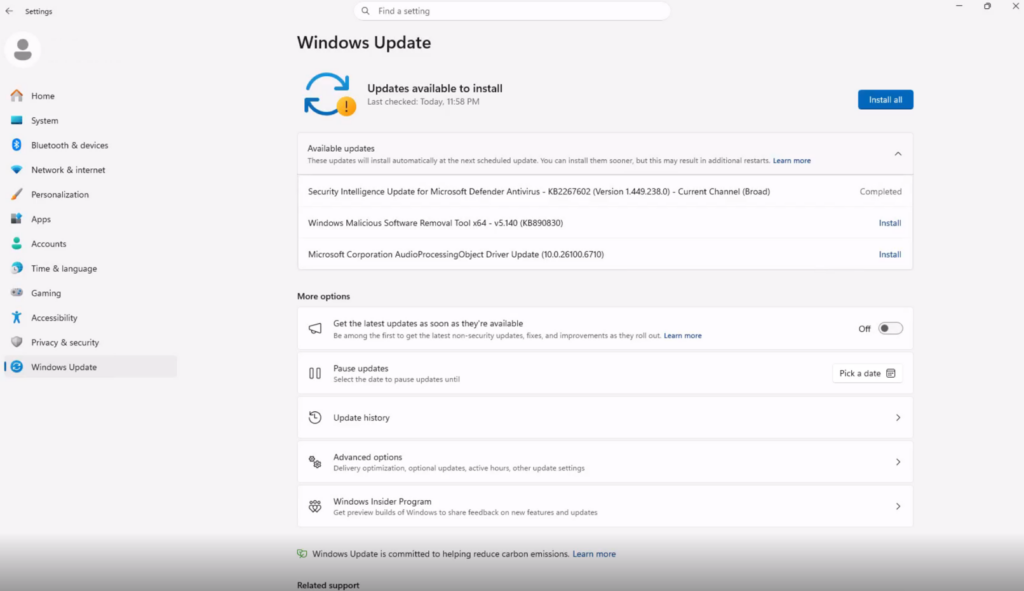
There is a matching change in the interface too. In Settings > Windows Update, all pending updates now appear together under a single “Available updates” section with an “Install all” option, rather than as separate scattered listings.
A new Pause updates calendar picker
The Pause updates control has also been redesigned. Instead of fixed pause lengths, you now get a calendar picker to choose a specific day, up to 35 days ahead, to pause updates until. You can extend the pause repeatedly in further 35-day increments with no hard cap, which gives more granular control than the old options allowed.
When will it reach your PC?
That depends on how you receive updates. Insiders in the Experimental and Beta channels currently see these coordinated updates roughly weekly, which is a testing cadence. Retail users who opt in to “Get the latest updates as soon as they’re available” would see a bi-monthly cadence. Standard retail users who are not opted into early updates are the ones set to benefit most, dropping to essentially one reboot per month once this ships broadly.
Microsoft has not confirmed a date for when the unified update experience reaches general, non-Insider Windows 11 PCs. Features that graduate to the Beta Channel usually precede a stable release by some months, but there is no firm timeline yet.
The same Build 26220.8764 also adds a few smaller items: Voice Access now supports Portuguese (Portugal), Portuguese (Brazil), and Korean (South Korea); a fix for Outlook not responding to its close button; and improved Mongolian Baiti font rendering.
Sources: Microsoft Learn (Windows Insider release notes, Build 26220.8764), Windows Insider Blog
