
WhatsApp Web calling is finally here. In an announcement dated 28 July 2026, WhatsApp said you can now make and receive audio and video calls — one-on-one and group — directly from WhatsApp Web, without installing anything. For a messaging app that has had calling on phones for a decade and on its desktop app for years, the browser has been the one place you could read messages but not pick up a call. That gap is now closed.
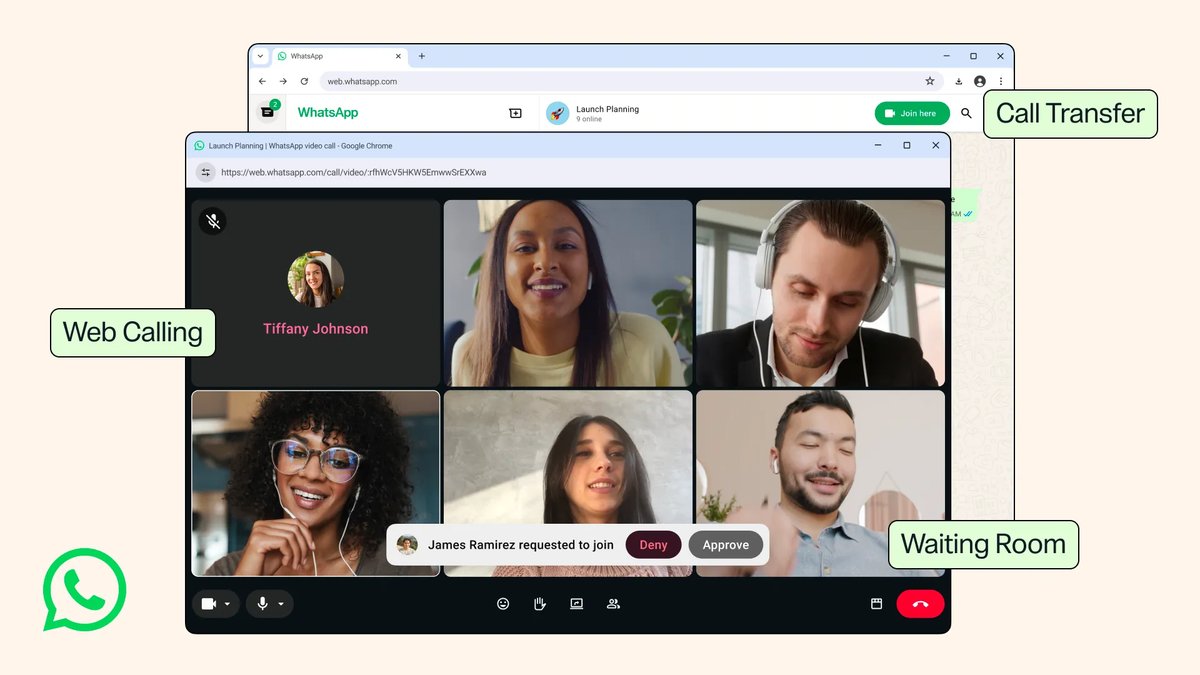
What WhatsApp Web calling actually gives you
The headline is the absence of an install step. WhatsApp Web runs in a browser tab, so a call can start on a machine where you cannot — or would rather not — install the desktop app. Locked-down office laptops, a borrowed PC, a shared machine at a co-working space: all of these now work with nothing more than the QR-code login you already use for messages.
Calls in the browser are not a stripped-down version either. WhatsApp says web calls include screen sharing and reactions, and there is a dedicated Calls tab carrying your full call history, the same as on the phone. Calls are end-to-end encrypted, with no time limit and no extra cost, which is not something every free video-calling service can say.
WhatsApp’s help centre lists web calling as supported on Windows, macOS and Linux, and says calling works best in Chrome, Edge, Safari and Firefox, with some browser versions unsupported. You will also need to grant the browser microphone and camera permission the first time.
Call Transfer: move a live call between devices
The second genuinely useful addition is Call Transfer. You can move an active group call from one device to another without hanging up — start a call on your phone on the way home, then push it to WhatsApp Web or the desktop app when you sit down at a bigger screen, or go the other way when you need to leave. Nobody on the call gets dropped and nobody has to redial.
The rest of it, in brief
- Waiting Room — when you create a WhatsApp call link with “Require approval to join” switched on, people who click it land in a waiting room until the host admits them. This is the fix for the long-standing problem of call links being forwardable to anyone.
- QuickHD — high-definition video from the first few seconds of a call, rather than the usual blurry ramp-up while the connection settles.
- Noise suppression — background noise removal, toggled from the in-call settings.
Worth knowing before you rely on it
End-to-end encryption in a browser tab is not quite the same trust boundary as end-to-end encryption in a native app. WhatsApp’s encryption claim is accurate, but a browser profile is a busier place than a standalone app: extensions, other tabs and anything with access to your browser session all share that environment. If you are taking a genuinely sensitive call on a machine you do not control, the desktop app or your phone is still the more conservative choice. That is a caveat, not a reason to avoid the feature — for the everyday “can you hop on a quick call” case, this is a clear win.
Two things WhatsApp has not spelled out in the announcement: whether your phone needs to stay online during a web call, and any participant cap for group calls in the browser. Until WhatsApp documents either, do not plan a large call around the browser without testing it first.
When will you get it?
WhatsApp says the features are rolling out gradually and will be available to everyone soon, with no dated timeline. To check, open web.whatsapp.com, sign in by scanning the QR code from your phone, open a chat and look for the call icons in the top-right corner — or look for a Calls tab in the left-hand rail. If they are not there yet, they are on the way; there is no setting to switch on.
If you are tidying up how much of your desktop these apps get to see, our guide to Firefox 153’s built-in Containers is a useful companion for keeping browser-based accounts separated.
Sources: WhatsApp, WhatsApp Help Center
