
Windows 11 is getting a new recovery option called Cloud rebuild, and it tackles one of the most painful PC problems there is: a machine that refuses to boot. Microsoft started testing the feature on July 6 in Insider Preview build 26300.8772 (Experimental channel), and it lets you reinstall Windows completely — including your device’s drivers — using nothing but an internet connection. No USB installation media, no Media Creation Tool, no second working PC.
Until now, if Windows was too damaged to start, your realistic options were Reset this PC (which depends on recovery files stored on the same possibly-corrupted drive) or building a bootable USB stick on another computer. Cloud rebuild removes both dependencies: it downloads a fresh, known-good Windows image straight from Windows Update and pulls in the drivers your specific hardware needs, so the PC comes back fully functional even if the installed OS is beyond saving.
How Cloud rebuild works
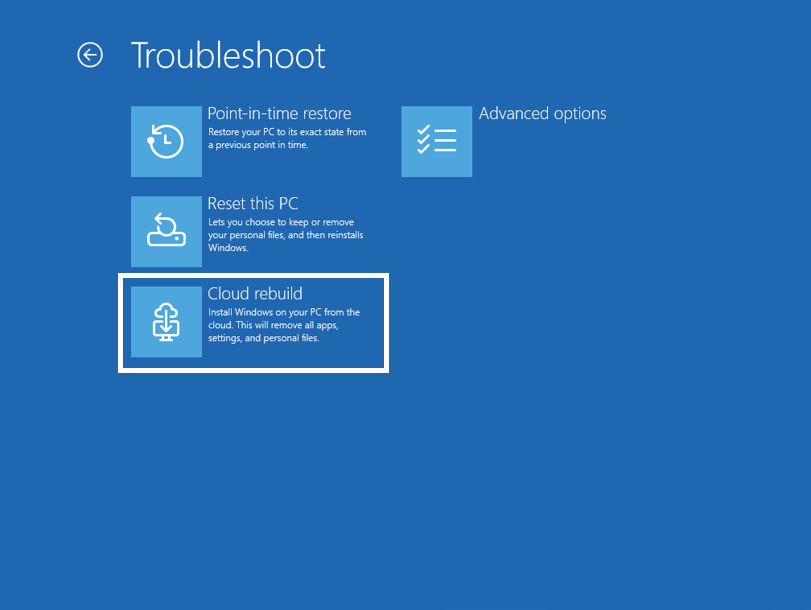
The feature lives in the Windows Recovery Environment (WinRE) — the blue troubleshooting screen your PC drops into when startup fails, or that you can reach via Settings > System > Recovery > Advanced startup. According to Microsoft’s release notes, the flow is:
- In WinRE, select Troubleshoot > Recovery and uninstall > Cloud rebuild.
- Connect to the internet over wired Ethernet or Wi-Fi from within the recovery environment.
- Review the target Windows build, edition and language, then confirm the data-loss warning to start the rebuild.
That data-loss warning is the key caveat: Cloud rebuild is a clean reinstall, so your personal files, apps and settings on the PC are wiped. It is a last-resort tool for a machine that won’t boot, not a casual refresh — which is exactly why keeping a backup (OneDrive, Windows Backup or an external drive) matters before disaster strikes, not after.
How it differs from Reset this PC and Point-in-Time Restore
Windows 11 now has three tiers of recovery. Point-in-Time Restore, arriving broadly in the July 14 update, rolls a working-but-misbehaving PC back to a snapshot from the last 72 hours, files included. Reset this PC reinstalls Windows using local or cloud files but relies on the existing installation being healthy enough to cooperate. Cloud rebuild is the nuclear option: a from-scratch reinstall with drivers, sourced entirely from Windows Update, that works even when nothing else does.
Account Control gets a redesign — with a subscription badge
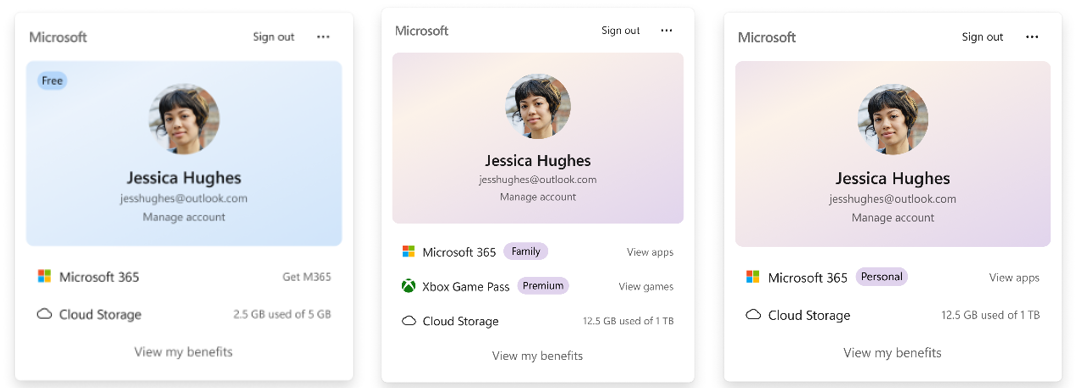
The same build refreshes the Account Control flyout — the panel that opens when you click your profile picture in the Start menu. It gets a modern design and a prominent badge showing your Microsoft 365 subscription status, along with your plan’s benefits, cloud storage usage and, in Microsoft’s words, options to “explore upgrades”. Worth noting from the user’s side: this turns a basic account panel into one more surface nudging you towards a Microsoft 365 subscription, continuing a pattern of upsell prompts creeping into the OS itself.
The rest of the build, in brief
- Windows settings backup will be enabled by default on eligible Microsoft Entra-joined work devices starting with version 26H2.
- The search box on the taskbar is 4 pixels taller.
- The Bluetooth quick settings page can now be navigated with a gamepad.
- Fixed: the search icon could turn invisible on a vertically positioned taskbar.
- Fixed: Outlook not responding to the close button, plus better screen-reader focus announcements in the new Run dialog.
When will it reach your PC?
Cloud rebuild is currently limited to Windows Insiders in the Experimental channel (build 26300.8772, with a matching 26H1 build 28120.2387) and is rolling out gradually via Controlled Feature Rollout, so not every Insider sees it immediately. Insiders can check Settings > Windows Update > Windows Insider Program > Feature flags to toggle eligible features on early. Microsoft hasn’t announced a date for general availability, but features that graduate from this channel typically land in a regular monthly update within a few months. For everyone else, the practical takeaway today is simpler: a dead Windows install may soon no longer require hunting for a USB drive and a friend’s laptop.
