
Microsoft has announced Project Zenith, a version of Windows 11 that arrives already set up for writing code. It was detailed on the Windows Developer Blog on 4 September 2026. The catch is the hardware bar. Project Zenith only ships on what Microsoft calls developer-class devices, meaning at least 64 GB of unified memory and 250 GB/s or more of memory bandwidth.
The first machines will use AMD’s Ryzen AI Halo silicon. Microsoft says more devices from its OEM and chip partners will follow in the coming months, without naming them or giving dates.
What Project Zenith actually changes in Windows 11
Two separate things are bundled here, and it is worth keeping them apart.
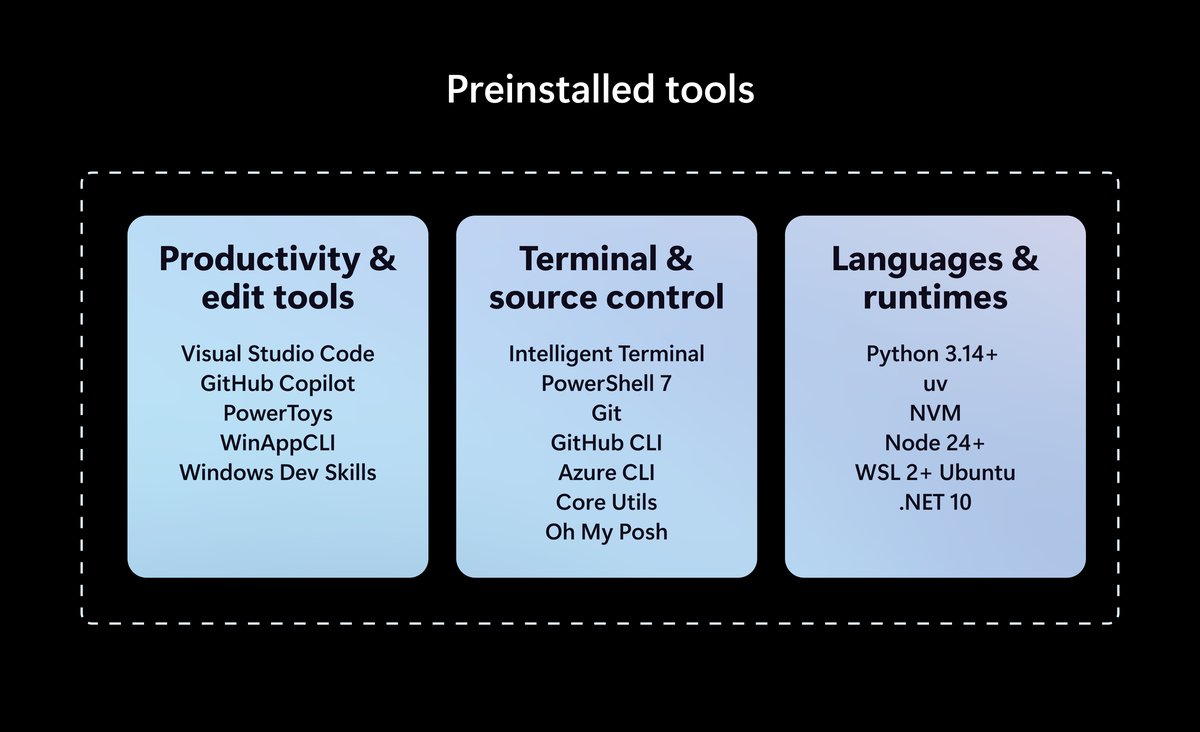
The first is a set of preinstalled tools. Microsoft’s own chart lists Visual Studio Code, GitHub Copilot, PowerToys, WinAppCLI and Windows Dev Skills under productivity, plus Intelligent Terminal, PowerShell 7, Git, GitHub CLI, Azure CLI, Core Utils and Oh My Posh for terminal and source control. Languages and runtimes cover Python 3.14+, uv, NVM, Node 24+, WSL 2 with Ubuntu, and .NET 10. Windows Terminal and VS Code are pinned to the taskbar out of the box.
The second is a batch of Windows settings flipped to developer-friendly defaults. File Explorer shows file extensions, hidden files, the full path in the title bar and the details pane, with long-path support switched on. Recently used files and folders and sync provider tips are off. Command Palette is enabled in Search and Start, while Start menu tips and account notifications are turned off.
The part that needs 64 GB, and the part that does not
Only one half of Zenith genuinely depends on the hardware. Microsoft’s stated reason for the 64 GB and 250 GB/s floor is running large models on the machine itself. The blog says developers can run 30B-plus parameter models locally and unmetered, cutting reliance on paid cloud tokens. That workload really does need the memory and the bandwidth.
The settings profile does not. Showing file extensions or turning off Start menu tips costs nothing in RAM. Those are toggles that exist on every Windows 11 PC already. Nothing in the announcement says whether this configuration profile will ever be offered on ordinary Windows 11 PCs. As it stands, a set of free toggles is bundled with a reason to buy an expensive new machine, alongside the local-AI feature that actually justifies the spec sheet.
When can you get it?
There is no download and no upgrade path here. Project Zenith comes preconfigured on qualifying new hardware, so an existing PC does not get it by installing an update. The first announced device in this bracket is Lenovo’s ThinkCentre X Ultra, a compact desktop built on AMD’s Ryzen AI Max+ PRO 495 and due in November 2026, which VideoCardz reports will launch in Europe at €3,100. Lenovo has not published India pricing for it yet.
If you only wanted the tidier Explorer and a cleaner Start menu, you can set all of that yourself today on any Windows 11 PC. We have covered similar clean-up work in our guide to removing AI features from Windows 11.
Sources: Windows Developer Blog, VideoCardz
