
Phone Link may soon let you shut down or restart your Windows 11 PC from your phone. Windows Latest reports finding a set of unused string resources in the Android Link to Windows app — the companion half of Phone Link — describing Restart, Shut down and Sleep controls that do not exist in the app today. Treat this as a code-level leak rather than an announcement: Microsoft has not announced these controls, and Windows Latest says the flags are off and that no tester, itself included, has seen the buttons.
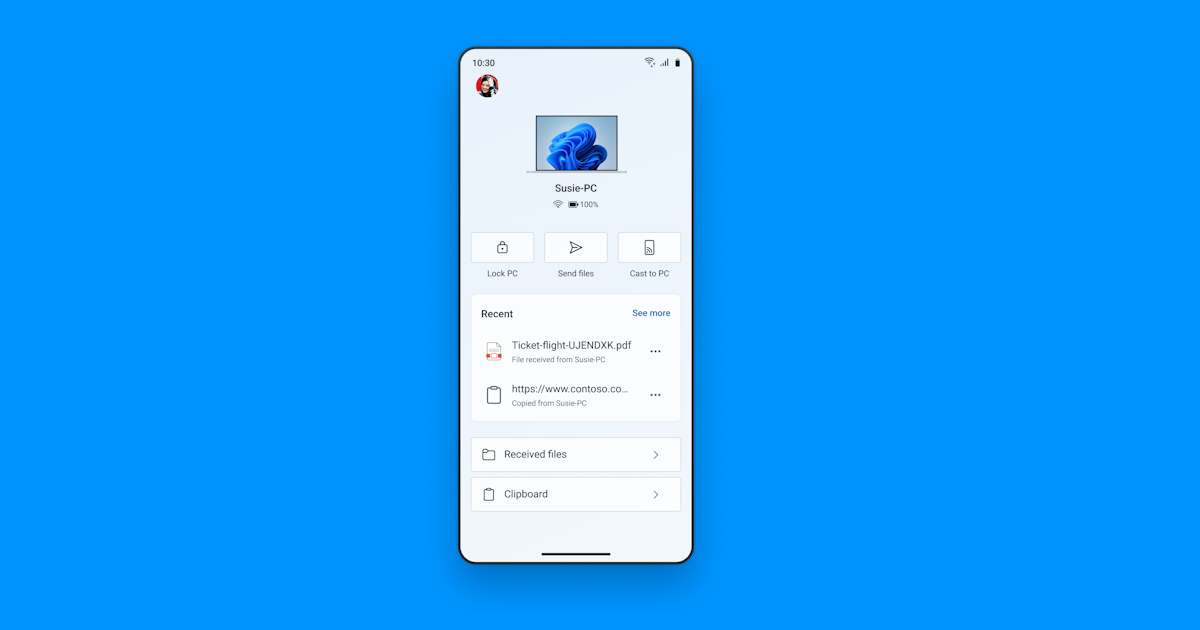
What the Phone Link remote shutdown controls would do
The strings sit under a component Windows Latest identifies as RemoteControlManager. From a debug log generated against an app build dated 25 August 2026, the outlet reports a flag named isRemotePcControlsV2Enabled reading enabled=false alongside experimentEnabled=false — the code is present, the feature is off. Here is what the labels describe:
- Restart and Shut down —
pc_controls_restart_labelandpc_controls_shutdown_label, the two obvious additions to the existing Lock PC button. - Update and restart / Update and shut down — separate labels (
pc_controls_update_and_restart_label,pc_controls_update_and_shutdown_label), which suggests the phone would be aware of a pending Windows Update rather than acting as a dumb power switch. - Sleep — with its own confirmation dialog, and its own caveat.
- Unsaved-work warnings — the update-and-restart dialog string reportedly warns that unsaved work in open apps will be lost and that, since you are away from the PC, you will not be able to save it from your phone.
The sleep option is the one with a real limitation attached. The dialog string Windows Latest quotes reads: “After it’s asleep, it will be disconnected from this device. You need to go to your PC to wake it up.” That is an honest warning rather than a bug — a sleeping PC drops its network connection, so unlike locking or restarting, sleep is a one-way trip until you are physically back at the machine.
What Phone Link can already do, and when this might arrive
Remote control is not new here. Microsoft’s Phone Link and Cross-Device Experiences team announced a refreshed Link to Windows app for Insiders in July 2025 that recast the app as a hub for controlling the PC, with remote actions — sending files to the PC, mirroring the phone’s screen, checking the PC’s battery and Wi-Fi status, and locking the PC remotely while it is connected. The buttons in that screenshot are exactly where Restart and Shut down would slot in.
There is no ship date and no version number. Microsoft has not commented, the flags are disabled, and no tester has seen the buttons, so nothing here is guaranteed to reach a release build in this form. If it does land, it will be an Android-side change first — Link to Windows is the Android app, and Microsoft’s post makes no equivalent claim for iPhone.
Worth a moment of thought before this arrives: a paired phone would become a device that can power down your PC mid-work. Phone Link already requires both devices to be signed in to the same Microsoft account and, per Microsoft’s own setup requirements, connected to the same Wi-Fi network, and the strings show confirmation prompts for the sleep and update-and-restart actions. Still, if your phone is unlocked in someone else’s hands, the blast radius of that pairing quietly grows. Microsoft has not said whether these controls will be separately toggleable, and it should be — remote lock and remote shutdown are not the same risk. It is the same granularity argument we made when Microsoft began testing per-app camera and mic blocking in Windows 11: a capability is only as safe as the switch that turns it off.
Sources: Windows Latest, Windows Insider Blog
