
The Windows 11 July 2026 update lands on Tuesday, July 14, and it is a lot bigger than a routine Patch Tuesday. The same package that ships as the monthly security update (KB5095093, builds 26100.8737 and 26200.8737) also switches on a new recovery tool called Point-in-Time Restore, a long-requested calendar for pausing updates, and the faster File Explorer Microsoft has been testing since June. Both Windows 11 24H2 and 25H2 get identical updates, so almost every Windows 11 PC in use today is covered.
Point-in-Time Restore: your PC gets an undo button
This is the headline feature. Point-in-Time Restore automatically takes a snapshot of your PC — Windows itself, installed apps, settings and your local files — using the Volume Shadow Copy Service, and lets you roll the whole machine back to how it was up to 72 hours earlier. Unlike the old System Restore, nothing is left out of the snapshot, which is why recovery takes minutes instead of an afternoon of troubleshooting.
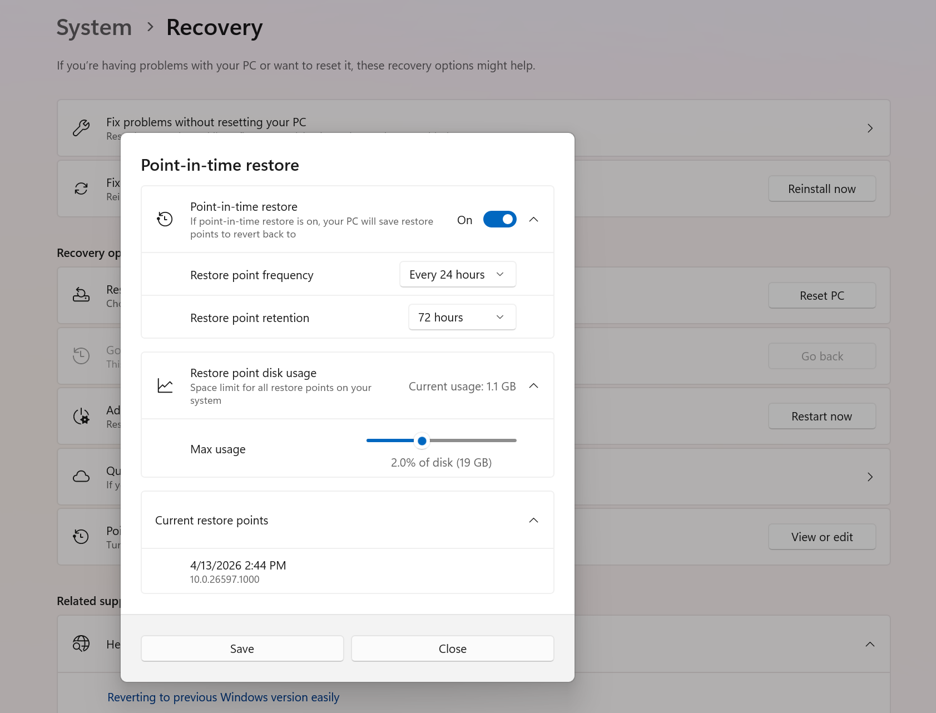
The defaults: a restore point every 24 hours, kept for 72 hours, using up to 2% of your disk (minimum 2GB, capped at 50GB). You can change the frequency, retention and space limit under Settings > System > Recovery > Point-in-time restore > View or edit. The actual restore runs from the Windows Recovery Environment — either automatically after repeated boot failures, or manually via Settings > System > Recovery > Advanced startup, then Troubleshoot > Point-in-time restore.
One catch worth knowing: the feature turns on by default only on Home and Pro PCs whose Windows drive is 200GB or larger. If you bought a budget laptop with a 256GB SSD — very common in India — you just about qualify, but a 128GB machine stays off by default, and on bigger drives Windows will quietly reserve space for snapshots. The 50GB ceiling is reasonable insurance, but if your SSD is already tight, check that slider after the update.
Pause updates until a date you pick
Windows Update’s blunt “pause for 1 week” button is gone. In its place is a calendar view where you choose the exact date updates resume, up to 35 days out — and when the pause expires, you can simply pause again. For anyone who has had an update restart their PC at the worst possible moment, this is the most practical change in the release.
File Explorer opens faster
The File Explorer speed-up Microsoft shipped in June’s optional update is bundled into this cumulative update, so everyone gets it now. Beyond quicker launch times, the address bar finally handles double backslashes and quoted paths properly, renaming a file no longer keeps re-selecting the text, and duplicate OneDrive entries have been fixed.
The rest of it, in brief
- Screen tint — a new accessibility overlay under
Settings > Accessibilitywith colour presets and adjustable strength to cut eye strain. - Magnifier — you can now type an exact zoom percentage instead of stepping through fixed levels.
- Widgets — no more expanding when you accidentally hover; notification badges are toned down.
- Bluetooth — faster AirPods pairing, better LE Audio recovery after disconnects, and quicker reconnection after hibernation.
- Printing — printers now install using Windows Ready Print (IPP) by default where supported; toggle under
Settings > Bluetooth & devices > Printers & scanners. - Voice typing — French, German and Spanish support with live punctuation, on Copilot+ PCs.
- Phone Link — outgoing calls stay on your phone while ringing and hand over to the PC only once answered.
- Small touches — customisable touchpad right-click zone, the Recycle Bin delete dialog shows real file names, and the emoji panel’s GIF search moves from Tenor to GIPHY.
When will it reach your PC?
The update becomes mandatory with the July 14 security rollout and installs automatically over the following days. You don’t have to wait: the same package has been available as June’s optional preview update since June 23. Go to Settings > Windows Update, turn on “Get the latest updates as soon as they’re available”, and click Check for updates. Note that some features arrive via Microsoft’s gradual Controlled Feature Rollout, so a few items — Point-in-Time Restore included — may take extra weeks to appear on your machine even after the update installs, and rollout in Europe may lag for regulatory reasons.
