How to Rearm / Activate Windows 7 for 120 days

by Avinash in Microsoft

Most of you know that Windows 7 RTM is out now though not officially. For those of you who are over enthusiasts and cant wait to test windows 7 must have downloaded Windows 7 RTM from somewhere either from torrents or some warez networks.

As many of you have noticed, you cant use release candidate RC or beta keys to activate Windows 7. You still need to wait till Windows 7 is officially available to public. Till that time you can use it as evaluation copy but just for 30 days.

There is a legal way to activate it for 120 days till public release. It is not a hack, it is a system put in place by Microsoft to give you more time to evaluate it.

1. Open the Start Menu.

2. In the Start Menu search box, type Regedit and press Enter.

Start Menu 300x256 How to Rearm / Activate Windows 7 for 120 days

3. In the registryEditor, go to:
HKEY_LOCAL_MACHINESOFTWAREMicrosoftWindows NTCurrentVersionSoftwareProtectionPlatform . In the right pane, see if SkipRearm is set to 0 (number 0)

Windows 7 Skip Rearm5. If it is not set to 0 – Right click on SkipRearm and click on Modify. Type 0 and click on OK. (See screenshot below).If it is set to 0 – Skip this and go to step 6.
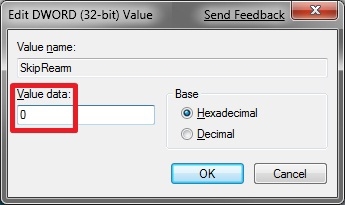
Windows 7 Rearm

6. Open a elevated command prompt (it will be elevated if you are Admin, or if not just run it as Admin)
7. In the elevated command prompt, type slmgr -rearm and press Enter. (See screenshot below)

Windows 7 Rearm 1

8. If successful you will get the below screenshot. Click on OK.

Windows 7 rearm doneYou can rearm to a maximum for 3 times that means a total of 120 days. So evaluate it for maximum before you decide to buy Windows 7. The above procedure i got from a forum and was posted by a user Brink aka Shawn.


  • kongthyllle

    Thankx dude, I should try this for considerance before buy

  • http://www.avinashtech.com avinashtech

    Welcome mate. I hope you succeed in the rearms.

  • http://www.jkwebtalks.com/ JK

    Thanks to the detailed info.

  • http://www.avinashtech.com avinashtech

    Welcome mate.

  • cerf

    any idea if the RTMs out now will activate with an MSDN or MAPS key?

  • http://www.avinashtech.com avinashtech

    You need a genuine Windows 7 key to activate it.This rearm can extend the evaluation period to 120 days only. RTM is out already but will be available to public later on.

  • ray_woods

    thanks for dat. But wat will happen after the days of activation are over( 120days.)

  • http://www.avinashtech.com avinashtech

    Obviously, it will start functioning unless you activate with a genuine Windows 7 key.

  • ketxorange

    Do we have to re-arm 3 times instantly to get the 120 days or re-arm every 40 days?

  • http://www.avinashtech.com avinashtech

    The rearm process resets the clock to 30 days evaluation. So you should be doing each rearm after say 29-30th day

  • ketxorange

    Alright thanks. Btw, any info about “Windows 7 Ultimate Cracked and Activated Permanently with OEM SLP Master Product Key (with SLIC 2.1)”?

  • http://www.avinashtech.com avinashtech

    Its seems that Windows 7 ultimate Activation is finally cracked.
    Take a look here.
    .

    http://www.avinashtech.com/microsoft/windows-7-ultimate-cracked-and-activated-with-oem-master-key/

  • http://www.avinashtech.com avinashtech

    Right now no info, but many hackers are working on it. You will know about it here when it arrives

  • carigis

    most of your steps with the registry are not needed..

    Open a elevated command prompt (it will be elevated if you are Admin, or if not just run it as Admin)

    In the elevated command prompt, type slmgr -rearm and press Enter…

    not sure what all the unecessary regedit stuff is about..Ive been re-arming for ages on many versions and its never been necessary. just do the command line stuff

  • http://www.avinashtech.com avinashtech

    Yes i know many of the Registry steps are not needed for most of guys but many guys get stuck with some error if they don't know what they are doing. Its just for help of those guys who get stuck with some errors.
    Otherwise for tech savy guys, running the rearm script/command is just typing a simple command.
    And hence the need for this article wont have risen as its just a simple command.

  • http://citgol.blogspot.com/ majik

    you have good web site I like follow you

  • http://www.avinashtech.com avinashtech

    Thank you mate.

  • http://citgol.blogspot.com/ majik

    you have good web site I like follow you

  • http://www.avinashtech.com Avinash

    Thank you mate.

  • http://www.avinashtech.com Avinash

    Thank you mate.

  • http://www.osnn.net/windows-7-tips-tweaks/97942-converting-7-rtm-ultimate-images-install-any-verison.html#post865043 converting the 7 RTM "ultimate" images to install any verison – OSNN Forum

    [...] Re: converting the 7 RTM "ultimate" images to install any verison From what I have read you can get 4 months use before having to put in your key. But you may need to go into the registry and allow rearm. [...]

  • http://www.avinashtech.com/microsoft/direct-download-links-for-windows-7-32bit-x86-and-64-bit-x64/ Direct Download Links for Windows 7 32Bit (x86) and 64-Bit (x64)

    [...] Note : -  You need a genuine Windows 7 Key to activate it and use it beyond 30 days or you can use it for 120 days using rearming it. [...]

  • amg

    crack to active windows 7 ! downloads! Link Deleted by Admin.

    Admin message :- Its not a place for cracks or pirated stuff.

  • amg

    crack to active windows 7 ! downloads! Link Deleted by Admin.

    Admin message :- Its not a place for cracks or pirated stuff.

  • amg

    crack to active windows 7 ! downloads! Link Deleted by Admin.

    Admin message :- Its not a place for cracks or pirated stuff.

  • ken

    people, make sure you right click the command prompt icon and select RUN AS ADMIN!!! otherwise your slmgr -rearm wont work!

  • ken

    people, make sure you right click the command prompt icon and select RUN AS ADMIN!!! otherwise your slmgr -rearm wont work!

  • ken

    people, make sure you right click the command prompt icon and select RUN AS ADMIN!!! otherwise your slmgr -rearm wont work!

  • מיכאל

    איך אני עוש את השלב הזה:
    פתח את שורת הפקודה מוגבה (זה יהיה מוגבה אם אתה מנהל, או אם זה לא רק לרוץ כמו מנהלה)

    בפקודה מוגבה הפקודה, סוג slmgr-rearm ולחצו על Enter
    תודה!

    Translated :

    How do I make haste this stage:
    Open an elevated command prompt (it will be raised if you run, or if it’s not just run as Admin)

    Elevated command prompt, type Slmgr-rearm and press Enter
    Thank you!

  • מיכאל

    איך אני עוש את השלב הזה:
    פתח את שורת הפקודה מוגבה (זה יהיה מוגבה אם אתה מנהל, או אם זה לא רק לרוץ כמו מנהלה)

    בפקודה מוגבה הפקודה, סוג slmgr-rearm ולחצו על Enter
    תודה!

    Translated :

    How do I make haste this stage:
    Open an elevated command prompt (it will be raised if you run, or if it’s not just run as Admin)

    Elevated command prompt, type Slmgr-rearm and press Enter
    Thank you!

  • מיכאל

    איך אני עוש את השלב הזה:
    פתח את שורת הפקודה מוגבה (זה יהיה מוגבה אם אתה מנהל, או אם זה לא רק לרוץ כמו מנהלה)

    בפקודה מוגבה הפקודה, סוג slmgr-rearm ולחצו על Enter
    תודה!

    Translated :

    How do I make haste this stage:
    Open an elevated command prompt (it will be raised if you run, or if it’s not just run as Admin)

    Elevated command prompt, type Slmgr-rearm and press Enter
    Thank you!

blog comments powered by Disqus

Previous post:

Next post: