For those of you who hate the new ribbon menu in office 2007 with buttons for every function instead of classic menu (as in office 2003), here’s a simple and easy solution. If you need classic menu for office 2007, you can access the Classic menu like office 2003 in office 2007 by installing a small addon which is basically  a Macro written in VBA.
You may have heard commercial and even free tools available that can enable classic menu in office 2007 but those are very bulky ones and the installations are like big setups. Here’s just say 20-30 Kb files can do the trick.

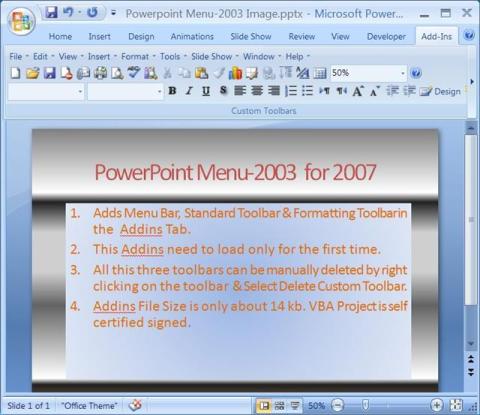

The add ins are separate for Word, Excel, Powerpoint and Access. You need to download files for each of the programs and then put those in Startup folder of Microsoft office program files.
With below Utilities you can use old menu i.e. Classic Menu in Office 2007. To use new features in office 2007, use Ribbon interface. To Minimise Ribbon press CTRL-F1 (Toggle Key) or double click on any TAB Name.
Once you fully explore it, you would like to use new Ribbon UI. For Excel,PowerPoint,Database, afterwards you may manually delete this Old Menu\Classic menu by right clicking on it & select Delete Custom Toolbar. For Words, you need to remove addins from startup folder.
Just download the small files and place them in appropriate folder. That’s all. When you run office 2007 now, you will find the classic menu under the tab Addins.

November 10, 2009 @ 1:16 PM
Also download exshail classic menu for excel-2007+ from above site.
August 25, 2012 @ 2:21 AM
Are these files still available to download?
August 25, 2012 @ 12:12 PM
Unfortunately the original download links are down. But I have updated the new download links. try downloading now,